Cyberdog

CYBERDOG VS CYBERDUCK

A free alternative to Cyberduck, with a terminal and server health built in

Cyberduck is a well-loved file browser for SFTP, FTP and cloud storage. Cyberdog does the same everyday job, then goes one step further: when you need to read a log, restart a service or find out why a disk is full, the terminal and a live health dashboard are in the same window, on the same connection. It is free, open source (MIT) and runs on macOS, Windows and Linux.

macOS, Windows & Linux · Free · MIT

Choose Cyberdog if…

  • You open a terminal or a monitoring tool every time you finish browsing a server.
  • You manage several servers and want groups, favorites, quick scripts and a health overview.
  • You want Linux support, or one tool for the whole team (shared servers, roles, history).
  • You reach private servers through a bastion and want to test the route before saving it.

Stay with Cyberduck if…

  • You rely on a wide range of cloud storage connectors (Backblaze B2, Google Cloud Storage, OpenStack Swift and more) through their native APIs.
  • You want to synchronize folders, or to mount remote storage as a drive with Mountain Duck, a separate product from the same team.
  • You use your OpenSSH config (ProxyJump, IdentityFile) heavily and want the SFTP client to follow it.
  • You want the most established client, with years of documentation and community answers.

Feature by feature

Cyberdog compared with Cyberduck
FeatureCyberduckCyberdog
Price and licenseFree download, supported by donations. Open source (GPL).Free. Open source (MIT). No account needed.
PlatformsmacOS and Windows (a command-line tool also runs on Linux).macOS, Windows and Linux.
ProtocolsSFTP, FTP/FTPS, WebDAV, S3, Azure, Backblaze B2, Google Cloud Storage, OpenStack Swift, Dropbox, OneDrive, Google Drive and more.SFTP, FTP/FTPS, WebDAV, S3-compatible (AWS, Google Cloud Storage, Backblaze B2, Wasabi, DigitalOcean Spaces, Scaleway), Azure Blob and Files, SMB (macOS, Windows), Dropbox, OneDrive, Google Drive.
File explorerBrowser, transfer queue, editing in an external editor, folder synchronization.Tabs, split view, remote search, permissions editor, resumable transfers, editing in an external editor. No folder synchronization yet.
TerminalOpens your system terminal.Built in, under the explorer, opened in the current folder.
Server healthNot included.CPU, memory, load, disks with alerts, uptime and latency, with no agent to install.
Services, logs, DockerNot included.systemd services, live logs, Docker containers and images, processes.
Scripts on several serversNot included.Quick actions: run a saved script on one server or on every open server.
Jump hostFollows ProxyJump from your OpenSSH config.Reusable bastion with a route test (one hop).
TeamsNo built-in team features.Teams with roles, shared servers, shared scripts and history. Free, with an optional account.
Import–Imports your Cyberduck bookmarks (and FileZilla or WinSCP sites).

Based on public documentation, checked November 2026. Products evolve: if something is out of date, please open an issue on GitHub.

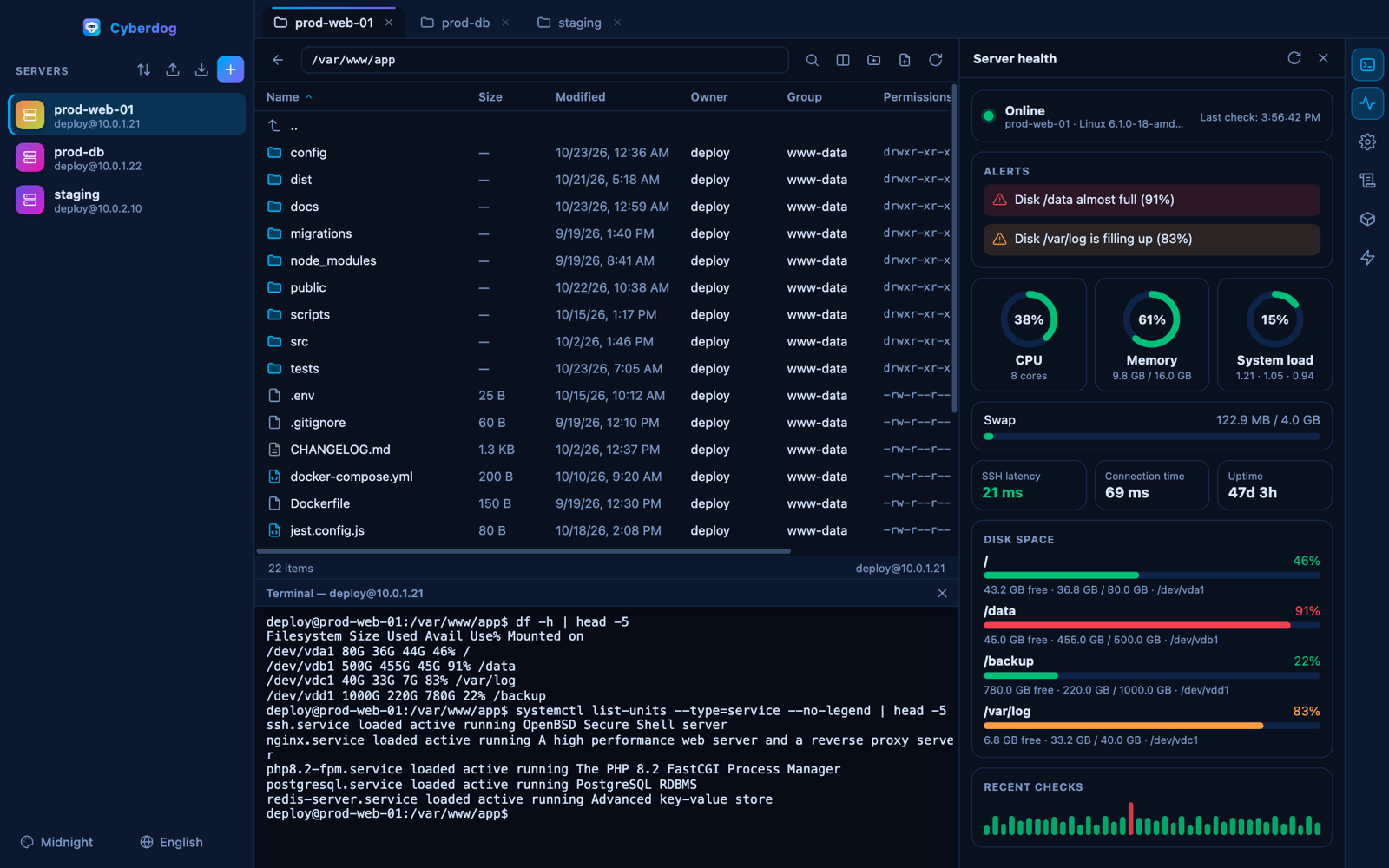
What Cyberdog looks like

Cyberdog: SFTP explorer, terminal and server health side by side
File explorer, terminal and server health in one window.

Moving from Cyberduck in one click

In Cyberdog, open the import menu and choose Cyberduck. Cyberdog reads your bookmarks folder, including the one used by the App Store edition, and adds them as servers. Passwords are not imported: they stay in the Keychain, so you enter them once in Cyberdog.

Questions

Is Cyberdog really free?

Yes. It is open source under the MIT license, with no account required and no paid tier. The optional account that lets you share servers with a team is free too.

Can I import my Cyberduck bookmarks?

Yes. Use the import menu and choose Cyberduck. Your servers appear in the list; third-party passwords are not imported.

Does Cyberdog support S3 and other cloud storage?

Yes: S3-compatible storage (AWS, Google Cloud Storage, Backblaze B2, Wasabi, DigitalOcean Spaces, Scaleway), Azure Blob and Files, WebDAV, Dropbox, OneDrive and Google Drive. Cyberduck supports a few more connectors, for example OpenStack Swift.

Is Cyberdog affiliated with Cyberduck?

No. Cyberdog is an independent open-source project and is not affiliated with or endorsed by the Cyberduck project.

Try Cyberdog

Free, open source, no account needed. Your passwords stay on your computer.

Other comparisons: Cyberdog vs TermiusCyberdog vs WinSCP

Cyberduck, Termius and WinSCP are trademarks of their respective owners. Cyberdog is an independent project and is not affiliated with or endorsed by them.